Human Anatomy Atlas 2026
- 4.8
- Rating
- 500.00K
- Installs
- $24.99
- Price
 Analysis by App-foxy
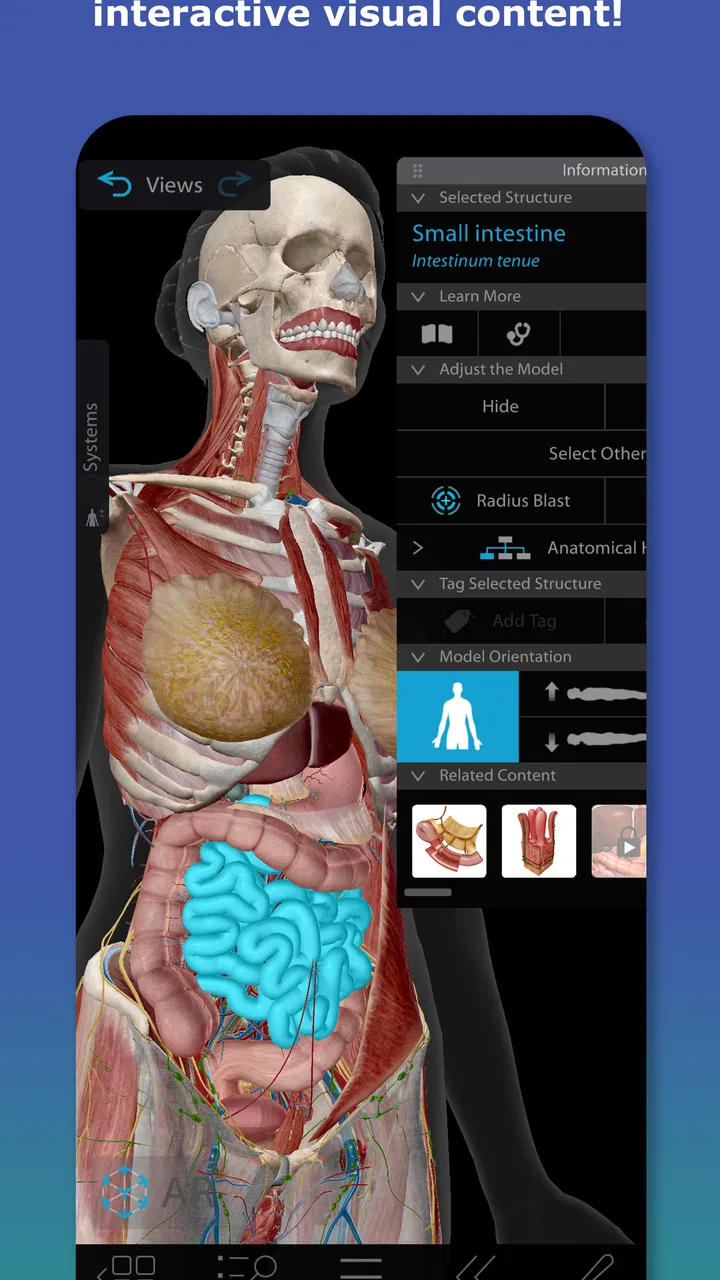
Human Anatomy Atlas 2026 made a strong first impression on me because it turns the body into something I can examine rather than simply read about. Instead of relying on a flat diagram or a long paragraph, I can move through a three-dimensional model and focus on how structures sit beside, behind, and beneath one another. That difference matters when I am trying to understand anatomy spatially, especially when a textbook image leaves me wondering what is hidden underneath the visible layer.
Developed by Visible Body Apps LLC, this medical app is aimed at anyone who wants a more visual way to study the human body. It is available for Everyone, runs on operating systems from version 12 onward, and is currently at version 2026.005.009. I see it as a serious reference and learning tool rather than a casual app to open once out of curiosity. The real question is whether that impressive first week turns into useful, repeatable study over the following months.
What the first week feels like
During my first sessions, the most useful habit was not trying to explore everything at once. I started with one region, rotated the model slowly, and used the visible layers to build a mental map. That approach made the atlas feel less like a collection of attractive pictures and more like a practical way to answer specific questions: What lies under this muscle? Which structure is next to this bone? How does a group of organs relate to the surrounding body?
You May Also Like

 Blood Strike: 2.5 Anniversary
Blood Strike’s Loadouts Turn Every Drop Into a Tactical Gamble
A close look at Blood Strike’s custom loadouts: how fast access to signature weapons reshapes its battle royale rhythm, rewards preparation, and narrows the gap between fights.

 Pandora - Music & Podcasts
Pandora’s Music Is Easy to Start, but Harder to Recover
Pandora’s strength is its low-effort path from a seed to a station. Its weak spot is how much confidence it asks you to place in connection, setup, and quiet recovery.

 8 Ball Pool
 Is Built on Rivalries, Rematches, and Routine
A close look at the rivalries, rematches, shared routines, and unanswered safety questions that turn a quick pool match into a persistent mobile community.

 Samsung Music
’s Quiet Strength Is Playing What You Already Own
Its reach comes less from spectacle than from dependable access to a personal library. That simplicity is both the app’s strongest retention engine and its ceiling.

 AccuWeather: Weather Radar
AccuWeather Review: A Quick, Clear Forecast for Everyday Decisions
For everyday plans, the best forecast is the one you can understand quickly. AccuWeather makes rain timing, radar, and local conditions easy to act on, with a few trade-offs.

 Hill Climb Racing
Why Hill Climb Racing Still Turns Crashes Into One More Run
A tiny car, a bumpy hill and one more upgrade: Hill Climb Racing keeps resurfacing because its simple chaos makes every near-miss feel personal.
More From Our News Desk



The three-dimensional presentation is especially helpful for learners who struggle with orientation. A printed illustration usually gives me one fixed viewpoint. Here, I can change the angle and inspect the same area from several directions. That is valuable when studying joints, muscle attachments, vessels, or the relationship between organs and nearby structures. I found that rotating the model before reading labels helped me understand the shape first, rather than memorizing isolated names.
A realistic first-week workflow would be to use the app alongside a class topic. If I were studying the shoulder, I would first review the bones, then hide or move through the surrounding layers, and finally test myself by naming structures before checking the labels. That turns a passive viewing session into retrieval practice. The app does not replace disciplined study, but it gives that study a much better visual workspace than a standard search page.
The interface can also be valuable for explaining anatomy to another person. A student preparing for a presentation, a tutor helping a classmate, or a health professional wanting a clearer visual aid can use the model to show relationships that are difficult to describe with words alone. I would still be careful about using it as a substitute for clinical instruction. An atlas can show anatomy clearly, but it does not diagnose symptoms or explain what is normal for every individual.
One of the less obvious strengths is the ability to treat the model like a layered puzzle. Rather than looking at the whole body and feeling overwhelmed, I can narrow attention to a region and gradually reveal how the parts fit together. This is a better use of the app than endlessly spinning the full figure. The novelty wears off quickly if exploration has no question behind it; it becomes useful when every session begins with a small anatomical problem to solve.
The visual quality is also the source of one early limitation. A detailed model can make a beginner feel that recognition equals understanding. I might recognize a muscle because I have seen its shape, yet still forget its function, attachment, or clinical relevance. For that reason, I would pair the atlas with class notes, a trusted textbook, or instructor guidance. Its strongest role is spatial clarification, not complete medical education on its own.
Who benefits most from the visual approach
I think the best fit is a medical, nursing, physiotherapy, sports science, or similar student who regularly needs to connect names with locations. It can also help anatomy enthusiasts and educators who want a more flexible reference than a wall chart. The app is particularly suitable for people who learn by manipulating objects and comparing views instead of memorizing a single illustration.
It is less convincing for someone who only wants a quick answer to a simple question. If I need to identify one bone once, a basic diagram or a library book may be faster and cheaper. The same is true for a user who expects an interactive atlas to function as a complete course, complete with a structured syllabus and constant guidance. I would choose this app for repeated visual study, not for occasional curiosity.
The price also changes the decision. At $24.99, this is an investment rather than a throwaway download, and additional in-app items range from $7.99 to $19.99 each. I would only pay after deciding that three-dimensional anatomy will be part of my regular learning routine. The cost makes more sense for a student who will return to the app across several subjects than for someone attracted mainly by the initial visual effect.
Why it can remain useful after the novelty fades
After the first month, the value depends on whether I change how I use it. Simply browsing the same body model becomes repetitive. Returning with a purpose keeps it relevant: reviewing a region before an exam, checking spatial relationships while reading a clinical case, preparing a lesson, or refreshing anatomy after time away from formal study. That recurring reference role is where the app earns its place.
My preferred monthly routine would be short and targeted. I would choose one body region, spend a few minutes identifying structures without labels, then revisit the difficult areas from a different angle. At the end, I would write down what I still confuse. The next session would begin with those weak points rather than with a fresh tour of the entire body. This makes the atlas part of a maintenance habit instead of an object I open only when motivation is high.
A useful trade-off is that the app supports visual recall better than it supports every other kind of recall. I can become good at recognizing a structure in the model while remaining weak at spelling, pronunciation, function, or clinical application. I would therefore use it in a three-step cycle: inspect the structure, explain it aloud without looking, and then verify the details in a separate study source. The atlas supplies the spatial anchor; the other source supplies the surrounding knowledge.
It is also practical for revisiting anatomy at different levels. A beginner may use it to understand broad regions, while a more advanced learner can use the same model to check fine relationships. That gives it more staying power than a single-purpose introductory diagram. Still, the user has to provide the progression. Without a planned sequence, the app can feel like a large reference shelf with no obvious study path.
The app’s strong user response suggests that many people find this format worthwhile: it holds an average rating of 4.8 from around 17 thousand ratings, and it has passed 500 thousand installs. I do not treat those figures as proof that it will suit everyone, but they do match my impression that the core experience is polished and useful for its intended audience. The important distinction is between satisfaction with the model and long-term study discipline. The first can come from a short session; the second has to be built by the user.
Keeping the app useful without making it a chore
Maintenance is relatively light in the sense that the app does not require a complicated routine to remain valuable. I can open it when a topic demands visual clarification and close it when the question is answered. That makes it easier to keep available as a reference than to force it into every study session. Its best long-term role may be as a companion tool that appears at the right moment, not as the only anatomy resource I use every day.
There is, however, a mental maintenance burden. I have to remember where the app helps and where it does not. It is excellent for spatial relationships, but I should not expect a three-dimensional view to teach every detail about physiology, pathology, examination technique, or patient communication. Keeping those boundaries clear prevents wasted time and avoids the dangerous habit of treating an attractive model as medical advice.
Storage and device comfort also deserve attention in everyday use, even without turning them into deal-breakers. Detailed visual apps are more demanding to use than a static PDF, and long sessions can become tiring if I am constantly rotating and zooming. I would use a larger screen when possible, keep sessions focused, and avoid studying an entire body region in one uninterrupted sitting. The experience is more effective when interaction supports a question instead of becoming the activity itself.
Another maintenance tip is to preserve a personal list of confusing structures. When I repeatedly mix up neighboring muscles or vessels, I can return to the same area and compare them deliberately. This is more efficient than browsing randomly. It also creates a reason to come back months later, when a quick visual refresher can restore a relationship that has faded from memory.
Where fatigue begins
The biggest source of fatigue is the gap between visual richness and learning direction. The first sessions invite exploration, but exploration alone has a short lifespan. Once I have rotated the model through familiar angles, the experience can feel less exciting. That is not necessarily a flaw in the atlas; it is a reminder that reference tools need questions, assignments, or personal goals to stay active.
Label-heavy study can create another kind of tiredness. When too many names appear at once, I may spend more energy searching for a label than understanding the structure. I get better results by narrowing the field and testing myself in small groups. Beginners should resist the urge to memorize the entire model in one sitting. A limited region and a clear objective produce more lasting recall than a broad but shallow tour.
The cost may also cause fatigue if I am uncertain about how often I will use the app. The initial price is substantial for a casual learner, and optional purchases can raise the overall commitment. I would not recommend buying into the ecosystem simply because the screenshots look impressive. The sensible decision is to ask whether I already have a recurring anatomy need: a course, teaching responsibility, exam preparation, or a long-term interest that justifies a dedicated visual reference.
Some users may also prefer traditional resources. A textbook is easier to annotate and often provides a more complete narrative. A flashcard system may be better for spaced repetition. A classroom or laboratory offers guidance and physical context that software cannot reproduce. I would choose Human Anatomy Atlas 2026 when three-dimensional orientation is the bottleneck; I would choose another option when the main problem is memorizing definitions, following a curriculum, or discussing real patient findings.
That distinction is important for safety. I would never use the atlas to identify a personal medical problem or to make a treatment decision. Seeing a structure in a model does not explain what a symptom means, and normal anatomy varies. For personal health concerns, professional medical advice remains the appropriate route. The app is a learning and reference tool, not a diagnostic service.
My long-term verdict
After the novelty fades, I believe this atlas can earn lasting space for the right user. Its durable value comes from being able to revisit anatomy spatially whenever a textbook image or memory is not enough. The strongest long-term workflow is selective: use it before a lesson, during revision, when preparing an explanation, or when a confusing relationship needs a fresh look. It does not need to dominate my routine to justify itself.
I would recommend it to serious students and visual learners who expect to return to anatomy repeatedly. I would also recommend it to educators who need a clear way to demonstrate relationships, provided they use it as support rather than as their entire teaching material. The current version, 2026.005.009, gives the app a current place in that study setup, while the operating-system requirement means I would check device compatibility before committing.
I would skip it if I only want occasional basic facts, if my budget is tight, or if I need a complete guided medical course rather than an interactive atlas. I would also skip it if I know I rarely study through visual models. In those cases, a good textbook, flashcards, or instructor-led material may offer more value for the same effort.
For me, the purchase makes sense when anatomy is an ongoing responsibility, not a one-day curiosity. The app’s 4.8 average and broad adoption support its appeal, but my recommendation rests more on its practical role: it helps turn confusing spatial relationships into something I can inspect and revisit. Its lasting strength is not the thrill of spinning a 3D body; it is the ability to return to one difficult region and finally make sense of how the parts fit together.
That is why I see Human Anatomy Atlas 2026 as a worthwhile medical reference with a clear condition attached: I need to use it actively. If I pair its models with recall practice, notes, and reliable instruction, it can remain useful month after month. If I only browse it for the visual effect, the appeal will fade quickly, and the price will feel harder to justify.
In short, I would recommend Human Anatomy Atlas 2026 to learners who want a hands-on visual companion for anatomy and are prepared to build a repeatable study habit. I would not present it as a replacement for books, teachers, laboratories, or medical professionals. Used within those limits, it is one of the more convincing ways to make the body’s three-dimensional organization easier to understand and easier to remember.
FAQs for Human Anatomy Atlas 2026
01What is Human Anatomy Atlas 2026?
Human Anatomy Atlas 2026 is a comprehensive 3D anatomy reference app designed for medical professionals, students, and anatomy enthusiasts. It offers detailed visuals of the human body, including muscles, bones, organs, and more. The app provides interactive models, quizzes, and essential information for learning and teaching purposes.
02Is Human Anatomy Atlas 2026 available for both Android and iOS?
Yes, Human Anatomy Atlas 2026 is available for download on both Android and iOS platforms. Users can find it on the Google Play Store and the Apple App Store. It ensures compatibility with a wide range of devices, offering flexibility for users across different operating systems.
03Does Human Anatomy Atlas 2026 require an internet connection to function?
Human Anatomy Atlas 2026 primarily functions offline once downloaded, allowing users to access anatomical models and information without an internet connection. However, some features, such as updates or additional online resources, may require internet access to ensure the app provides the most current and comprehensive content.
04What features make Human Anatomy Atlas 2026 stand out?
Human Anatomy Atlas 2026 stands out with its high-quality 3D models, interactive quizzes, and educational content. Users can explore detailed anatomical structures with ease, using features like zooming, rotating, and dissecting models. It also includes detailed descriptions, making it a valuable tool for both learning and teaching anatomy.
05Are there in-app purchases or additional costs in Human Anatomy Atlas 2026?
While Human Anatomy Atlas 2026 offers a robust set of features upon initial purchase, there may be optional in-app purchases for additional content or advanced features. Users should review the app’s store listing for a clear understanding of what is included and what might incur extra costs.
Pros
- Comprehensive 3D models for detailed exploration.
- User-friendly interface for easy navigation.
- Regular updates with the latest anatomical data.
- Offline access to content enhances usability.
- Interactive quizzes for effective learning.
Cons
- Requires significant storage space on devices.
- Some features locked behind a paywall.
- Occasional glitches in 3D rendering.
- Limited pediatric anatomy content.
- Voiceover pronunciation could be improved.

Human Anatomy Atlas 2026
Gallery